Is your LG window AC feeling less fresh than it should? Over time, dust and grime build up inside, making your unit work harder and your air less clean.
But what if you could keep your AC spotless without lifting a finger? Learning how to auto clean your LG window AC not only saves you time but also boosts its performance and extends its life. In this guide, you’ll discover simple steps to activate and maintain the auto clean feature, so your room stays cool and your air stays pure—all with minimal effort from you.
Ready to make your AC smarter and cleaner? Let’s dive in.
Benefits Of Auto Cleaning
Auto cleaning in LG window AC units offers several important benefits. It helps keep the air fresh and the machine running smoothly. This feature saves time and effort by cleaning the unit automatically after use. Here are some key advantages of using the auto clean function.
Improved Air Quality
Auto cleaning removes dust and moisture inside the AC. This stops mold and bacteria from growing. Cleaner air means fewer allergens and better health for you. It helps keep your room fresh and safe to breathe.
Enhanced Cooling Efficiency
When the unit stays clean, it cools better and faster. Dirt can block airflow and reduce cooling power. Auto clean keeps the filters and coils clear. This means the AC uses less energy and cools more effectively.
Reduced Maintenance Effort
Cleaning an AC manually can be hard and slow. Auto clean does the job by itself after each use. It lowers the need for deep cleaning and repairs. This saves you money and keeps the AC in good shape longer.

Credit: www.youtube.com
Preparing Your Lg Window Ac
Preparing your LG window AC is the first step to ensure a smooth auto clean process. Taking time to prepare helps avoid damage and keeps you safe. Proper preparation also makes cleaning easier and more effective.
Power Off And Unplug
Always turn off the air conditioner before starting any cleaning. Find the power button and switch it off. Then, unplug the unit from the electrical outlet. This step prevents electric shock and protects the AC from damage.
Accessing The Control Panel
Locate the control panel on your LG window AC. Usually, it is on the front or top of the unit. Open the panel carefully to reach the settings and buttons for auto cleaning. Handle the panel gently to avoid breaking any parts.
Gathering Necessary Tools
Collect all tools needed for cleaning your LG window AC. You might need a soft cloth, a small brush, and a vacuum cleaner. Having everything ready saves time and helps clean the unit properly. Avoid using harsh chemicals that can damage the AC parts.
Activating Auto Clean Mode
The Auto Clean mode in your LG Window AC helps keep the unit dry and fresh. It prevents mold and bad smells by drying the inside parts. Activating this mode is simple and can be done using the remote or the unit’s manual buttons. This section explains the easy steps to turn on Auto Clean mode for better air quality and longer AC life.
Using The Remote Control
Take the LG AC remote control and press the “Auto Clean” button. If you don’t see this button, look for a button labeled “Clean” or “Dry.” Press it once to activate the mode. The AC will start the cleaning process automatically. This method is the fastest and easiest way to turn on Auto Clean mode.
Manual Button Activation
If you lost the remote or it is not working, use the manual buttons on the AC unit. Find the “Power” and “Mode” buttons on the front panel. Turn on the AC by pressing “Power.” Then, press the “Mode” button repeatedly until “Auto Clean” appears on the display. Press the “Power” button again to confirm the setting. This activates the Auto Clean mode without the remote.
Confirming The Mode Is On
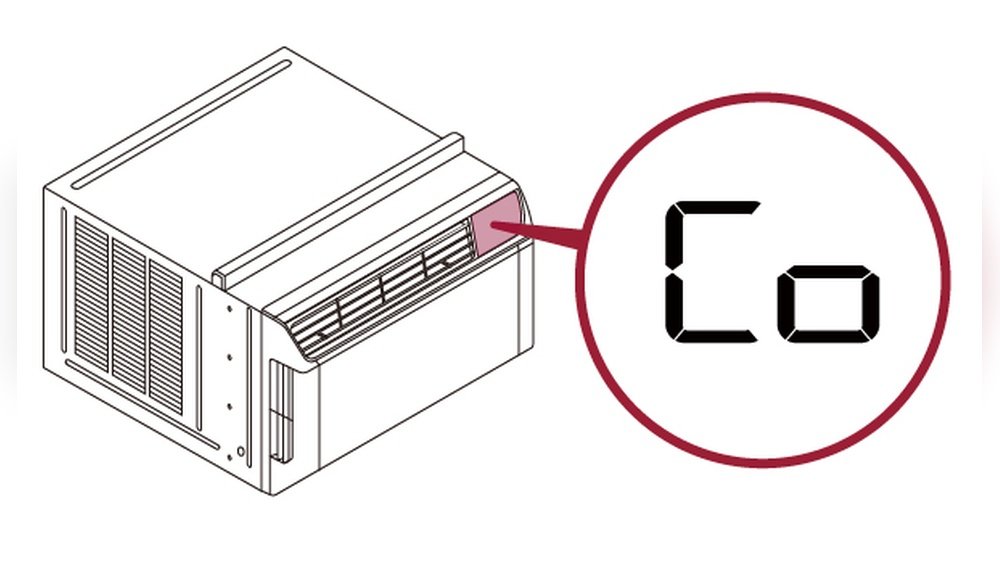
Check the AC display screen for the Auto Clean icon or text. A small water droplet or brush symbol might appear. Listen for a soft humming sound, which means the cleaning cycle is running. The AC will continue this mode for 10 to 30 minutes. After it finishes, the unit will turn off or return to normal mode automatically.
Credit: www.lg.com
Auto Cleaning Process Explained
The auto cleaning process in LG window AC units keeps your air conditioner fresh and efficient. This feature removes moisture and dirt inside the unit. It helps stop mold and bad smells from building up. The process is simple and automatic, making maintenance easy for you.
How Auto Clean Removes Moisture
After you turn off the AC, the auto clean function starts. It runs the fan to dry the inside parts. This removes leftover water from the cooling coils. By drying moisture, it prevents mold and bacteria growth. This keeps the air clean and healthy.
Duration And Indicators
The auto cleaning process usually takes about 30 minutes. During this time, the fan runs without cooling. Some LG models show a blinking light or a message on the display. These indicators tell you that the cleaning is in progress. After finishing, the AC returns to standby mode.
What To Expect During Cleaning
You will hear the fan running even when cooling is off. The AC does not blow cold air during cleaning. No buttons need pressing; the process is fully automatic. Your room stays quiet with only a soft breeze from the fan. This simple step keeps your AC cleaner for longer.
Additional Maintenance Tips
Keeping your LG window AC clean is important for its performance. Auto clean helps, but extra care is needed. Follow these simple maintenance tips to keep your AC running smoothly and fresh. Small tasks can make a big difference in air quality and energy use.
Cleaning The Air Filter
Remove the air filter gently from the unit. Wash it with warm water and mild soap. Let it dry completely before putting it back. Clean filters stop dust and dirt from blocking airflow. Do this every two weeks for best results.
Checking The Drainage System
Look at the drainage pipe for clogs or leaks. Clean any dirt or mold you find. A clear drain keeps water from backing up inside. This prevents bad smells and water damage. Check drainage once a month to avoid problems.
Regular Professional Servicing
Book a technician to service your AC every year. Professionals check parts and refrigerant levels. They clean hard-to-reach areas inside the unit. This keeps the AC efficient and extends its life. Annual servicing saves money on repairs later.

Credit: www.reddit.com
Troubleshooting Auto Clean Issues
Troubleshooting auto clean issues with your LG window AC can save time and avoid frustration. The auto clean feature helps keep your AC fresh by drying the inside of the unit. Sometimes, this feature might not work as expected. Knowing what to check can help you fix the problem quickly.
Auto Clean Not Starting
Check if the AC is plugged in properly. The auto clean function needs power to run. Make sure the AC is set to the correct mode. Some models only allow auto clean after cooling. Also, confirm the room temperature is within the required range. Too hot or too cold may stop the auto clean from starting.
Clean the air filter regularly. A dirty filter can block the auto clean process. Turn off the AC and remove the filter. Wash it with water and let it dry completely. Reinstall the filter and try the auto clean again.
Error Messages And Fixes
LG window ACs show error codes for different problems. Common codes include “E1” for sensor issues or “F2” for drainage problems. Check the user manual to identify the error. Reset the AC by unplugging it for a few minutes. Plug it back in to clear minor errors.
Clear any blockages in the drainage pipe. Water buildup can stop the auto clean. Use a thin brush or pipe cleaner to remove dirt. If the error persists, check the temperature sensor. Clean it gently with a soft cloth to remove dust.
When To Contact Support
Contact LG support if the auto clean still fails after basic fixes. Persistent error codes or no response from the unit need expert help. Avoid opening the AC yourself to prevent damage. A technician can diagnose and fix complex issues safely.
Use LG’s official website or customer service number for support. Keep your model number and purchase details ready. This helps the support team assist you faster. Regular maintenance prevents many auto clean problems.
Frequently Asked Questions
How Does Lg Window Ac Auto Clean Feature Work?
The auto clean feature removes moisture inside the unit after use. It prevents mold and bad odors. This keeps the AC fresh and efficient.
Why Use Auto Clean On Lg Window Ac Regularly?
Regular auto cleaning stops dust and bacteria buildup. It improves air quality and extends your AC’s lifespan. Plus, it reduces maintenance needs.
Can Auto Clean Improve Lg Window Ac Performance?
Yes, auto clean removes internal moisture and dust. This prevents blockages and keeps cooling optimal. It ensures the AC runs smoothly longer.
How Often Should I Use Auto Clean On Lg Window Ac?
Use the auto clean feature after every cooling cycle. For heavy use, run it weekly. This keeps the unit hygienic and working well.
Conclusion
Auto cleaning your LG window AC keeps it working well. It removes dirt and stops bad smells. Regular cleaning saves money on repairs. It also helps the AC cool your room better. Follow simple steps to keep the unit fresh and clean.
Take care of your AC to enjoy cool air all summer. Small effort brings big comfort. Stay cool, stay happy.
Leave a Reply